——易用性和可扩展性
by bupo.
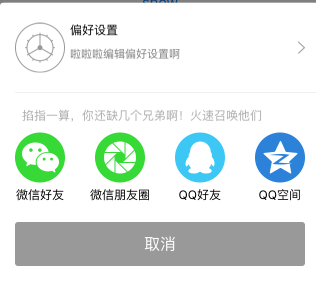
这里通过实现一个弹出菜单控件为例。弹出菜单如图所示,菜单可以有多行,每一行有多个选项,每一行可能有个标题,每行有多个选项,如果选项个数超过屏幕范围可以左右滑动。点击选项执行对应的功能模块。这里把这个控件命名为ScrollActionSheet。

实现
通过界面和需求可以分析出,ScrollActionSheet 包含几个部分:
- 选项按钮ActionSheetItemView;
- 包含多个选项和标题的一个可滑动模块HorizontleScrollPannel;
- 取消按钮,就是一个简单的button;
这三个部分是ScrollActionSheet的UI,这几个模块中,我们需要找出哪些东西是会变化的,哪些是不变化的,然后把变化的部分独立出来,把不变的封装起来。用户使用的时候只需要通过继承或者组合的方式修改可变的部分就可以使用这个ScrollActionSheet。可以看出用户可能改变的部分都在ActionSheetItemView中,包括图片,标题,点击后的回调方法,还有这个ActionSheetItemView的大小和布局;而HorizontleScrollPanner和整个ScrollActionSheet不需要去改动。
所以这里ActionSheetItemView 需要负责布局和展示自己的内容,所以我们独立出另一个类ActionSheetItem。大概的关系如下图所示:

使用的时候只需要创建ActionSheetItem添加到ScrollActionSheet中展示就可以了
1
2
3
4
5
6
7
8
9
10
11
12
13
14
15
16
17
18
19
20
21
22
23
24
25
26
27
28
29
30
31
32
33
34
35
36
37
38
39
40
41
42
43
44
| - (void)showShareView
{
NSMutableArray *shareItems = [NSMutableArray array];
NSMutableArray *moreItems = [NSMutableArray array];
[shareItems addObject:[BPScrollActionSheetItem itemWithImage:BPIMAGE(@"more_icon_share_wx.png") title:@"微信好友" action:^(BPBaseActionSheetItem *item){
NSLog(@"item click:%@",item);
}]];
[shareItems addObject:[BPScrollActionSheetItem itemWithImage:BPIMAGE(@"more_icon_share_friends.png") title:@"微信朋友圈" action:^(BPBaseActionSheetItem *item){
NSLog(@"item click:%@",item);
}]];
[shareItems addObject:[BPScrollActionSheetItem itemWithImage:BPIMAGE(@"more_icon_share_qq.png") title:@"QQ好友" action:^(BPBaseActionSheetItem *item){
NSLog(@"item click:%@",item);
}]];
[shareItems addObject:[BPScrollActionSheetItem itemWithImage:BPIMAGE(@"more_icon_share_qzone.png") title:@"QQ空间" action:^(BPBaseActionSheetItem *item){
NSLog(@"item click:%@",item);
}]];
BPLongActionSheetItem *item = [BPLongActionSheetItem itemWithImage:BPIMAGE(@"qualifying_icon_set") title:@"偏好设置" subTitle:@"啦啦啦编辑偏好设置啊" action:^(BPBaseActionSheetItem *item){
NSLog(@"item click:%@",item);
}];
[moreItems addObject:item];
NSDictionary *section = nil;
if ([shareItems count] > 0) {
section = @{
@"title":@"掐指一算,你还缺几个兄弟啊!火速召唤他们",
@"items":shareItems,
};
}
NSDictionary *upperSection = @{
@"title":@"haha ",
@"items":moreItems,
};
NSArray *sections = nil;
sections = @[upperSection,section];
BPScrollActionSheet *actionSheet = [[BPScrollActionSheet alloc] initWithItems:sections description:nil cancelButtonTitle:@"取消"];
[actionSheet showInView:self.view];
return;
}
|
如上面代码所示,LongActionSheetItem继承自ActionSheetItem,比ActionSheetItem多了一个小标题字段,其对应的View为LongActionsSheetItemView负责自定义布局,对于自定义的Item用户只需要继承ActionSheetItem和ActionSheetItemView自定义内容和布局即可。
这里通过组合封装达到了易用性的目的,而可扩展性则通过独立出可变模块,通过组合,继承来实现。具体的代码稍后会上传到github,点击这里下载